Sunday, December 7, 2014

Sunday, November 30, 2014
Blog Post #5 Part B
PLNS
 My PLN is still a work in progress. I have found it useful to keep websites I often use for class or even things I may use in everyday life on this. I am slowly working on filling up the page with website after website. I like the thought of using a PLN in a classroom because the students will have access to everything they need on one page.
 C4T # 4 Tina Barseghian
Mind Shift Blog:
Curiosity in Young Learners Is the Foundation of Academic Success
This post is about how preschoolers are starting to make meaning out of the world around them. It talks about how this helps them later learn complicated math and science. My first comment is "My name is Jennifer Parker and I attend the University of South Alabama. How do you know the students are interpreting everything the correct way for them to learn complicated math and science?"
Comment #2 : Hello,
My name is Jennifer Parker and I attend the University of South Alabama. I'm interested in becoming a Kindergarten teacher. I'm also expecting my first child. As a future teacher and mother, I found this very informing. Thank you for sharing.
Curiosity in Young Learners Is the Foundation of Academic Success
This post is about how preschoolers are starting to make meaning out of the world around them. It talks about how this helps them later learn complicated math and science. My first comment is "My name is Jennifer Parker and I attend the University of South Alabama. How do you know the students are interpreting everything the correct way for them to learn complicated math and science?"
Comment #2 : Hello,
My name is Jennifer Parker and I attend the University of South Alabama. I'm interested in becoming a Kindergarten teacher. I'm also expecting my first child. As a future teacher and mother, I found this very informing. Thank you for sharing.
Sunday, November 23, 2014
C4K November Summary
my student's name is Jasmine. Her recently blog post is about her weekend. She is a very active girl. My comment was "Hi Jasmine,
My name is Jennifer Parker and I attend the University of South Alabama. I think you had a very exciting weekend. Do enjoy your swimming lessons? My little sister loves shoes. Do you?"

My student's name is Elijah F. His recent blog post was about his morning and what his does at school. My comment to him was "Hey Elijah,
My name is Jennifer Parker and I attend the University of South Alabama. I think your blog is great. You have a very busy schedule during the week. I was wondering what your favorite subject is? I personally love math. Also, what is your favorite thing about school? I always loved recess so I could joke and play with my friends."

My student's name is Michael. His recent blog post is what he has accomplished for this quarter with his grades and goals. My comment was "Hey Michael,
My name is Jennifer Parker and I attend the University of South Alabama. I like how you organized your blog post. I'm glad you have learned something new, I think that is one of the best things in school. I'm happy to hear you meet your goals for the first quarter. I also hope you accomplish your goals next quarter. Good Luck! "
My name is Jennifer Parker and I attend the University of South Alabama. I think you had a very exciting weekend. Do enjoy your swimming lessons? My little sister loves shoes. Do you?"
My student's name is Elijah F. His recent blog post was about his morning and what his does at school. My comment to him was "Hey Elijah,
My name is Jennifer Parker and I attend the University of South Alabama. I think your blog is great. You have a very busy schedule during the week. I was wondering what your favorite subject is? I personally love math. Also, what is your favorite thing about school? I always loved recess so I could joke and play with my friends."
My student's name is Michael. His recent blog post is what he has accomplished for this quarter with his grades and goals. My comment was "Hey Michael,
My name is Jennifer Parker and I attend the University of South Alabama. I like how you organized your blog post. I'm glad you have learned something new, I think that is one of the best things in school. I'm happy to hear you meet your goals for the first quarter. I also hope you accomplish your goals next quarter. Good Luck! "
Blog Post # 14
Teaching our children can be a profession
- Giving far more school choices to families
- Using Technology to improve teaching and learning
- Adopting a knowledge-based curriculum
- Starting education before a child is 5 years old
- Professionalize teaching

Yes, teaching should be professionalized! However, maybe we should think a little more on the guidelines and the requirements for a teacher to become a professional, like a doctor or lawyer.
Sunday, November 16, 2014
Blog Post #13
How would you introduce technology to your Kindergarten Class
Prepare a lesson after the first week of school to show your new students how to use an iPad and computer. Plan the lessons based on your knowledge of how well your Kindergarteners will listen. You will not grade on their knowledge of what they have learned until the end of the school year. You will help them each week learn something new on the iPad or the computer. You would have something like a quiz to test if they are understanding what is happening, for example, each individual student may show you how to use it.
Videos to help with lessons:
iPads in Kindergarten 1
iPads in Kindergarten: 2
iPads in Kindergarten 3
iPads in Kindergarten 4
iPads in Kindergarten 5
My dream is to teach Kindergarten. In the 21st century technology has taken over. Almost every school now uses some type of technology in the classroom. When entering school for the first time Kindergarteners are nervous, excited, and scared. However, the majority want to learn. I want to introduce technology while they are young, so when they get older, they have experience with iPads and computers. They should know the basics and even how to run some apps involved. Lesson plans that involve teaching new things on iPads and/or computers.

Prepare a lesson after the first week of school to show your new students how to use an iPad and computer. Plan the lessons based on your knowledge of how well your Kindergarteners will listen. You will not grade on their knowledge of what they have learned until the end of the school year. You will help them each week learn something new on the iPad or the computer. You would have something like a quiz to test if they are understanding what is happening, for example, each individual student may show you how to use it.
Videos to help with lessons:
iPads in Kindergarten 1
iPads in Kindergarten: 2
iPads in Kindergarten 3
iPads in Kindergarten 4
iPads in Kindergarten 5
My dream is to teach Kindergarten. In the 21st century technology has taken over. Almost every school now uses some type of technology in the classroom. When entering school for the first time Kindergarteners are nervous, excited, and scared. However, the majority want to learn. I want to introduce technology while they are young, so when they get older, they have experience with iPads and computers. They should know the basics and even how to run some apps involved. Lesson plans that involve teaching new things on iPads and/or computers.
Sunday, November 9, 2014
Saturday, November 8, 2014
C4T #3 Julie Greller
A Media Specialist's Guide to the Internet:
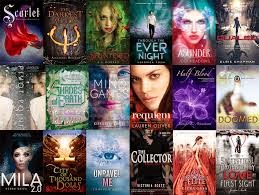
Her most recent post was a video naming the "Top Ten" young adult books. My comment was
Her most recent post was a video naming the "Top Ten" young adult books. My comment was
"Hello,
My name is Jennifer Parker and I attend the University of South Alabama. I love to read and I have never heard of any of this books so thank you for posting this."
She never commented on my first comment. My second comment was " Hello,
I posted a comment two weeks ago. I have recently been wondering how often the update this list? Also, how do they get the votes for the books?"
My name is Jennifer Parker and I attend the University of South Alabama. I love to read and I have never heard of any of this books so thank you for posting this."
She never commented on my first comment. My second comment was " Hello,
I posted a comment two weeks ago. I have recently been wondering how often the update this list? Also, how do they get the votes for the books?"
Sunday, November 2, 2014

Blog Post #11 What can we learn about teaching and learning from these teachers?

Back to the Future: This video is on the blog Learning is Messy. Brian Crosby starts by telling how he is comparing how his students were at the beginning of the year, and how they have improved at the end of the year. His students did a lot of activities along with the reading and lectures. He has them embed videos of their group activities on their individual blogs. This video is inspirational, because he motivates his students to learn by giving them hands-on experience with what they are learning about.
Blended Learning Cycle: Paul Andersen uses a cycle that blends different learning styles in his classroom to help his students learn. He even had it styled like a video game at one point. The blended learning is when you use online techniques and a classroom style learning together. The Learning cycle consists of engaging, exploring, explaining, expanding, and evaluating. You then blend all of this together for you classroom. Starts with a question ( the hook), investigate (experiment), video, elaboration, review, and summary quiz. This style allows you plenty of room for creativity.
Making Thinking Visible: This is a book by Ron Ritchhart. It is about changing the way we teach and learn in a classroom. It talks about how we base knowledge off of test scores instead of the intelligence of the child's thinking. I think this would be a great experience in a classroom. Where test scores do not matter.
Sam Pane 4th Grade: Sam Pane uses a comic that he has built to teach the students about the safety on the internet. I think this is a wonderful way to teach children. It keeps them interested while teaching them things about making comics and writing, but also keeping them safe.
Project Based Learning: This is about a school that actually does not focus on a single subject, but a mesh of subjects. The projects also involve multiple subjects at once. I like this idea because the students aren't learning one thing but multiple things. It has made everything important and not just certain things. It has also given the students more time to learn.
Roosevelt Elementary's PBL program: This video shows what project based learning can do for both the students and the teachers. I like these ideas because it does help the students with many things and helps them learn what they are being taught. I would love to use this in my classroom in the future.
Sunday, October 26, 2014
Blog Post #10 What can we learn from Mrs.Cassidy?


She believes information is more collaborative so the teacher should be creative to make the assignments individually yours.
She thinks Facebook could be a good learning tool like Twitter. This can help students find other teachers or students for resources. She teaches them not to go to places they aren't suppose to be. They only have certain places they can visit that are linked to her homepage.
In my own classroom, I'm not entirely sure what I would use. However I know I will not use twitter. I only started using twitter in this class and honestly I don't really like it. I do want to teach with technology because like we have said in previous assignments it has become a major part of the world. I'm not sure I would do blogging in a Kindergarten class but I would use it in a higher grade level, starting with the first grade. I do like the idea of using an Ipad or tablet for reading and other things for smaller children.

C4K Summaries October
My Student's name is Darren. His blog post is of a picture. He is strictly talking about the color sunset-ish orange. I asked him what they color was. I also commented on his painting.
My second student's name is Bella. Her blog post is about What Kids Should Be Able To Decide In School. She wants to be able to decide how long she has in between classes, how long lunch is, when lunch is, and how long her classes are. My comment was " Hello Bella,
My name is Jennifer Parker and I attend the University of South Alabama. I agree you should have some say in some of these things. I remember middle school and we had 5 minutes and it still wasn’t enough time to use the bathroom and make it across the school and my locker. Also I never had enough time at lunch, even in high school. I suggest eating enough to fill you up before you go to recess or even a bigger breakfast."
My third student's name is Finnley. His blog post said "likeschool". My comment was the following: "Hi Finnley,
My name is Jennifer Parker and I attend the University of South Alabama. I was wondering if your post meant you like school in general? If so, what do you like about it? I like when I get to learn something new. I also enjoy doing great on test and projects."
My Fourth student's name Paris. She posted about the Rena Oil Spill. She talked about how it sank because of a reef and now the water is polluted. My comment was "Hi Paris,
My name is Jennifer Parker and I attend the University of South Alabama. Thank you for telling me about the Rena Oil Spill. I have not heard of this one. I lived really close to the oil spill that happened in the United States a few years ago."
My second student's name is Bella. Her blog post is about What Kids Should Be Able To Decide In School. She wants to be able to decide how long she has in between classes, how long lunch is, when lunch is, and how long her classes are. My comment was " Hello Bella,
My name is Jennifer Parker and I attend the University of South Alabama. I agree you should have some say in some of these things. I remember middle school and we had 5 minutes and it still wasn’t enough time to use the bathroom and make it across the school and my locker. Also I never had enough time at lunch, even in high school. I suggest eating enough to fill you up before you go to recess or even a bigger breakfast."
My third student's name is Finnley. His blog post said "likeschool". My comment was the following: "Hi Finnley,
My name is Jennifer Parker and I attend the University of South Alabama. I was wondering if your post meant you like school in general? If so, what do you like about it? I like when I get to learn something new. I also enjoy doing great on test and projects."
My Fourth student's name Paris. She posted about the Rena Oil Spill. She talked about how it sank because of a reef and now the water is polluted. My comment was "Hi Paris,
My name is Jennifer Parker and I attend the University of South Alabama. Thank you for telling me about the Rena Oil Spill. I have not heard of this one. I lived really close to the oil spill that happened in the United States a few years ago."
Sunday, October 19, 2014
Blog Post #9 What Can Students and Teachers Teach Us About Project Based Learning?
Seven Essentials for Project-Based Learning
One essential is "need to know". Give the students a good reason to know what you want to teach them. A way that could be more fun way to learn. John Larmer and John R. Mergendoller call it an "entry event". A second essential is to have a "driving question". This gives the student a sense of purpose. They like the challenge. The criteria should be an open-ended, complex and linked to the core of what you want students to learn. This question will be the support of your project. The third essential is " student voice and choice". This gives the student more of a choice about the project. The teacher can have a list of their choices but more of an option. The fourth essential is "21st Century Skills". This should include collaboration, communication, critical thinking, and the using technology. The teacher should teach and assess these skills and also allow the student to assess themselves. The fifth essential is "inquiry and innovation". The students do not simply use books, websites, or other resources, they use their own questions to find innovation which leads to new questions. The sixth essential is "feedback and revision". Feedback needs to be available throughout the entire project so students know what they can improve while they are still working on it. It teaches students that they won't always get it right the first time. The seventh and last essential is "a publicly presented project". The students will put more work into a project that is being presented in front of a real audience. The project will have better quality because they will not want to embarrass themselves in front of people.
Project Based Learning For Teachers
There is no more "busy work" for students. They are spending a certain amount of time answering a certain question, the driving question. It requires students to have an end product and for them to share their learning. It also includes the common core studies. It improves the collaboration skills, communication skills, critical thinking skills, and career and life skills. You also use technology! Students are taking charge of their learning.
PBL- High School Math
Not a lot of people think math could be in project based learning. Teachers are learning how to use this in a math class. They are more focused on the learning now then on the tests they are being giving. PBL is only used in certain concepts because it can not be used for everything without losing content.
What Motivates Students?
If you give a student praise for doing well on something, it makes them feel good about themselves. Instead of giving the student negatives reviews of their work. Also, their future motivates them. They want to be able to support themselves and family. They also want to have a good job. Getting into college is also a major motivator. They are also motivates by being able to do extra curricular activities. Teachers can have in classroom motivators to help with students attitudes and grades.
Ten Sites Supporting Digital Classroom Collaboration in Project Based Learning
One website is Titan Pad. It is a great way to share a document. You don't need to sign in or an email to use this website. Also Wall Wisher is a website that has virtual post-it notes on a virtual wall. Then you have Corkboardme is a program is used for a group project that includes collaborative activities. Google Docs, which we use in this class, is used for for sharing documents and online collaboration. Microsoft Live is also used for collaboration tools. Today's Meet is a way to run a back channel in the classroom. A plus side is you do not need hash tags, logins, or accounts. Will you type with me is like Titan Pad but has some more capabilities like attaching more than Word files. It also has a timeline function. Linoit is an online electronic classroom display board. It is available anywhere. Skype in Education is a communicating program. Quick Screen Share helps you share your screen with anyone.
One essential is "need to know". Give the students a good reason to know what you want to teach them. A way that could be more fun way to learn. John Larmer and John R. Mergendoller call it an "entry event". A second essential is to have a "driving question". This gives the student a sense of purpose. They like the challenge. The criteria should be an open-ended, complex and linked to the core of what you want students to learn. This question will be the support of your project. The third essential is " student voice and choice". This gives the student more of a choice about the project. The teacher can have a list of their choices but more of an option. The fourth essential is "21st Century Skills". This should include collaboration, communication, critical thinking, and the using technology. The teacher should teach and assess these skills and also allow the student to assess themselves. The fifth essential is "inquiry and innovation". The students do not simply use books, websites, or other resources, they use their own questions to find innovation which leads to new questions. The sixth essential is "feedback and revision". Feedback needs to be available throughout the entire project so students know what they can improve while they are still working on it. It teaches students that they won't always get it right the first time. The seventh and last essential is "a publicly presented project". The students will put more work into a project that is being presented in front of a real audience. The project will have better quality because they will not want to embarrass themselves in front of people.
Project Based Learning For Teachers
There is no more "busy work" for students. They are spending a certain amount of time answering a certain question, the driving question. It requires students to have an end product and for them to share their learning. It also includes the common core studies. It improves the collaboration skills, communication skills, critical thinking skills, and career and life skills. You also use technology! Students are taking charge of their learning.
PBL- High School Math
Not a lot of people think math could be in project based learning. Teachers are learning how to use this in a math class. They are more focused on the learning now then on the tests they are being giving. PBL is only used in certain concepts because it can not be used for everything without losing content.
What Motivates Students?
If you give a student praise for doing well on something, it makes them feel good about themselves. Instead of giving the student negatives reviews of their work. Also, their future motivates them. They want to be able to support themselves and family. They also want to have a good job. Getting into college is also a major motivator. They are also motivates by being able to do extra curricular activities. Teachers can have in classroom motivators to help with students attitudes and grades.
Ten Sites Supporting Digital Classroom Collaboration in Project Based Learning
One website is Titan Pad. It is a great way to share a document. You don't need to sign in or an email to use this website. Also Wall Wisher is a website that has virtual post-it notes on a virtual wall. Then you have Corkboardme is a program is used for a group project that includes collaborative activities. Google Docs, which we use in this class, is used for for sharing documents and online collaboration. Microsoft Live is also used for collaboration tools. Today's Meet is a way to run a back channel in the classroom. A plus side is you do not need hash tags, logins, or accounts. Will you type with me is like Titan Pad but has some more capabilities like attaching more than Word files. It also has a timeline function. Linoit is an online electronic classroom display board. It is available anywhere. Skype in Education is a communicating program. Quick Screen Share helps you share your screen with anyone.
Sunday, October 12, 2014
Implications and Teaching Opportunities for Camara Use in Teaching and Learning

Technology has become an invader in the world. It has made an impact on everyone and even has been input in the school systems. Some counties have banned the use of technology, while others only allow certain things to be in the classroom, and others have certain times when technology is allowed. For example Foley High School only allows cell phone use in between classes, during breaks and lunch. It is prohibited to be used in class.
The implications for education, school, teachers, and learners is that we are finding ways to use technology in schools without losing control on what the students can do during class. The data provided in the class blog, shows students and young adults have become reliable on their cell phones, some even require a camera when looking to buy a new one. I think teachers and schools should use this to their advantage when providing an education. If you can't beat them, join them.
Part B:
Why banned the use of technology? When I'm a teacher in the future, I'm sure most, if not all, of my students will have a smartphone or a tablet. I think we should use these as resources. However, I do not think they should be present for test, because it just makes it to easy to cheat on things. I hope I can trust my students to use technology to the best of their abilty without being dishonest. With the use of smartphones and tablet we have information in the palm of our hands, we should use that to our advantage especially in a class room.
CAT #2 Brian Crosby
"Sometimes You Feel Like You Have Not Even A Remote Idea Of What's Going On!"
This teacher had given a presentation at a school district's Professional Development day. He set up early and also started a little early since the room was full. He was doing great and had people laughing. However, after a while he noticed he slides were changing on their own, every 15 seconds or so. He though he was holding the remote to tight, he was alright for a little while until it started happening again, so he turned off his remote and he used his arrows on the keyboard. Finally, he was back in sync and had the room's attention again. All the sudden it started again, the only thing he could do was plow ahead. When his presentation was over, he met with other presenters. Come to find out everyone had the same problem during the presentations. They were each changing the others slides.
My first comment is "Hello,
My name is Jennifer Parker. I attend the University of South Alabama and am in the EDM 310 class. I was wondering if you found a way to prevent this from happening again? I’m sure some found it funny while others found it frustrating. I’m wanting to teach Kindergarten, so I’m not sure if this will help me. However, I would love to know how to avoid this in the future. Also I was wondering how your presentation went when you had to plow ahead? Did you keep the interest of the people in the room?"
Brian's Response:

This teacher had given a presentation at a school district's Professional Development day. He set up early and also started a little early since the room was full. He was doing great and had people laughing. However, after a while he noticed he slides were changing on their own, every 15 seconds or so. He though he was holding the remote to tight, he was alright for a little while until it started happening again, so he turned off his remote and he used his arrows on the keyboard. Finally, he was back in sync and had the room's attention again. All the sudden it started again, the only thing he could do was plow ahead. When his presentation was over, he met with other presenters. Come to find out everyone had the same problem during the presentations. They were each changing the others slides.
My first comment is "Hello,
My name is Jennifer Parker. I attend the University of South Alabama and am in the EDM 310 class. I was wondering if you found a way to prevent this from happening again? I’m sure some found it funny while others found it frustrating. I’m wanting to teach Kindergarten, so I’m not sure if this will help me. However, I would love to know how to avoid this in the future. Also I was wondering how your presentation went when you had to plow ahead? Did you keep the interest of the people in the room?"
Brian's Response:
Blog Post #8 What Can We Learn About Teaching and Learning From Randy Pausch?

I learned a lot while watching this video. I admire how he focused on how to get the most out of life instead of focusing on the fact that he is dying of cancer. He stated the brick walls are not meant to stop you but to show you how much you want something in life. You have to work hard for something that you really want. He is showing us that everything that can go wrong when trying to achieve something will. You should have fun while trying to achieve things in life. He showed me I want to be a teacher that learns and teaches her students, while we all have fun
Subscribe to:
Posts (Atom)
Now that I know it was an issue of other remotes, I’d just turn off the remote and remove the reader you plug into your computer to make it work and just use the controls on my laptop to run the presentation. Hope that helps."
My second response:
"Brian,
Thank you for your response. This did help. I'm still new to some of this technology, but thank you for telling me how you avoid this problem. Hopefully by the time I graduate I will know how to work all programs."